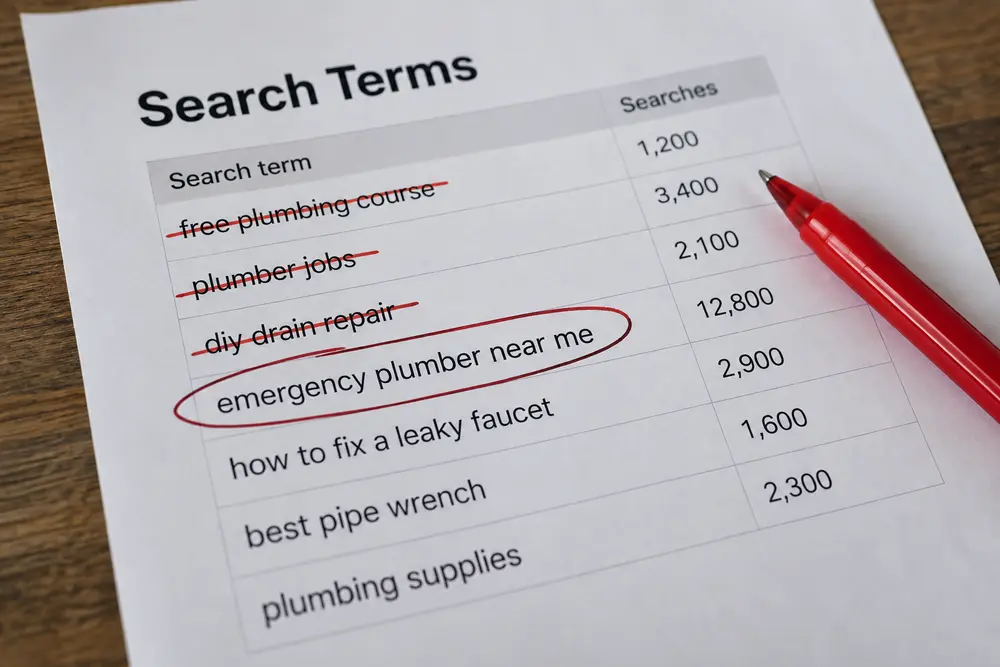
Are your negative keywords actually protecting your budget, or are they blocking people who were ready to buy? That’s the uncomfortable question, because Google Ads makes wasted clicks visible while qualified searches stopped by an exclusion can disappear without much fanfare.
The biggest negative keyword mistakes happen when you treat more exclusions as better control. Aggressive search term exclusions can make performance look cleaner while shrinking your reach, especially when one ambiguous word gets applied across an entire account.
Your objective should be precise intent control. You want to remove searches that clearly don’t fit your offer without cutting off useful demand because a search contains “free,” “support,” or some other word that looked suspicious during a rushed review.
Why Negative Keyword Mistakes Stay Hidden
Irrelevant clicks are easy to notice because they appear in your search terms and consume spend. Blocked opportunities are harder to diagnose. Once a negative prevents your ad from serving, you can’t open a report and see every valuable search that exclusion stopped.
This creates a dangerous incentive to keep adding negatives whenever costs rise. Traffic may fall, and the account may appear more efficient at first glance. That doesn’t prove the exclusions improved anything. Your ads could simply be entering fewer useful auctions.
Mistake: Excluding a Word, Not an Intent
A single word rarely tells you enough about search intent. “Free” can signal someone seeking something with no commercial value, but it can also appear in “accounting software with free migration” or “free consultation for estate planning.” Those searches may fit your offer perfectly.
The same problem applies to “training.” A software company may want to exclude people seeking training courses. However, “software with employee training” could describe a buyer comparing onboarding support. Blocking the word everywhere throws away context.
Before excluding an ambiguous word, read the complete query and ask what the person appears to want. If one specific search is irrelevant, a negative exact match gives you tighter control. A wider exclusion needs evidence that the repeated pattern consistently represents unwanted intent.
Your offer also determines what counts as irrelevant. “Free estimate” could be valuable for an HVAC company that promotes estimates, while “free HVAC certification course” probably isn’t. The word isn’t the problem. The intent surrounding it is.
Mistake: Choosing the Wrong Match Type
Google Ads negative match types don’t behave exactly like positive match types. According to Google’s explanation of negative keyword matching, broad, phrase, and exact exclusions each block a different set of searches. Choosing one without checking its reach is how a sensible exclusion becomes collateral damage.
Negative exact match blocks the exact query without extra words. If you exclude [free bookkeeping course], that exact search is blocked, while “free bookkeeping course for employees” can remain eligible. Exact is a sensible starting point when you’ve confirmed one bad query but haven’t established a broader pattern.
Negative phrase match blocks searches containing the complete phrase in the same order. Excluding “bookkeeping course” would block “free bookkeeping course online.” It could also block a useful search such as “bookkeeping software with course access” if that phrase appears intact and the offer includes educational resources.
Negative broad match blocks a search when every negative term appears, even when the order changes. A broad negative built from “free accounting software” could block “accounting software with free migration” because all three words are present. That’s a bad trade if free migration is part of your sales pitch.
Before using negative broad match, ask whether every search containing that complete set of words is unsuitable. If you can find a plausible valuable exception, narrow the match type or revise the excluded language.
Mistake: Applying It at the Wrong Level
A correct negative can cause damage when you apply it too broadly. One ad group may sell replacement systems and have no interest in repair searches. Another ad group in the same campaign may promote repairs. A campaign-level negative for “repair” would undermine the second offer.
The safest rule is to place an exclusion at the narrowest level where the intent is genuinely irrelevant. Use an ad-group negative for a local mismatch. Move it to the campaign only when the term is unsuitable throughout that campaign. Google’s instructions for adding negative keywords to campaigns explain the available placement options.
Shared lists and account-level controls deserve extra caution. They’re convenient, which is exactly why they get overused. A location outside one branch’s service area may be covered by another branch. A “commercial” search may be useless to a residential ad group while being valuable elsewhere. Universal exclusions should be reserved for intent your entire business rejects.
Mistake: Expecting One Negative to Catch All
Negative keywords don’t automatically cover close variants in the same way positive keywords can. Blocking “job” doesn’t guarantee that “jobs” will stop appearing. A misspelling or different abbreviation may continue triggering ads as well.
The answer isn’t to generate a giant synonym list and paste it into every campaign. Review actual query patterns first. Add a variation when the search terms show that it carries the same unwanted intent, and check that the variation doesn’t have a useful meaning for another service.
Mistake: Neglecting Search Term Reviews
Your targeted keyword shows what you asked Google to pursue. The search term shows what a person actually entered. Those can be very different, which makes the Google Ads search terms report the strongest starting point for exclusion decisions.
Reviews should focus on repeated mismatches and searches with meaningful traffic. One odd query can be handled precisely. A recurring pattern, such as people searching for certification classes when you sell business software, may justify a phrase-level exclusion.
Don’t wait for total spend to spike. Review search terms after changing match types or launching a campaign. Expanded locations and revised landing pages are also good triggers because each change can alter the traffic your ads attract.
A clean report doesn’t prove that every irrelevant search has disappeared. Google doesn’t show every individual query in the report. Treat the available terms as evidence, then watch broader traffic quality and lead relevance for signs that an unwanted pattern continues.
A Safer Exclusion Review Process
A repeatable process keeps search term exclusions from becoming emotional reactions to a bad click. Use this sequence before you make a change:
- Read the complete search term. Don’t make the decision from the targeted keyword or one isolated word.
- Classify the likely intent. Decide whether the search is clearly relevant, clearly irrelevant, or ambiguous. A relevant query served by the wrong ad should be routed more carefully.
- Find the smallest unwanted pattern. Determine whether one exact query is the issue or a repeated phrase consistently signals poor intent.
- Check for valuable exceptions. Search current terms for qualified queries containing the same language. Confirm that the exclusion won’t conflict with an active offer.
- Choose the narrowest match and scope. Apply the exclusion only where the mismatch exists, using the match type that covers the verified pattern.
- Record and validate the change. Note what you excluded and why. Then check whether junk traffic declines without a corresponding loss of qualified searches.
Documentation matters because negative lists tend to outlive the reasoning behind them. Months later, someone sees “support” in a shared list and assumes it must be there for a good reason. A short note makes it possible to audit the decision instead of trusting inherited account clutter.
When a Negative Is the Wrong Fix?
A nonconverting query isn’t automatically irrelevant. The term may have too little data, or the buying process may take longer than your reporting window suggests. Semantic relevance comes first. Performance helps you judge what to do once the intent is understood.
Sometimes the query exposes an ad or landing-page problem. A person searching for an exact service may click because your ad fits, then leave because the page discusses a different offer. Excluding that query hides the mismatch. Tightening the message and destination is usually the smarter repair.
A useful search can also belong in another campaign. Commercial inquiries reaching a residential ad group should be routed to the commercial offer if you provide one. Excluding them across the account would erase demand you already earned.
DIY Review or PPC Help?
You can handle this yourself if your account has a small campaign structure and you can review search terms consistently. You should be able to explain every broad exclusion, identify where each negative applies, and check positive keywords for conflicts. If those records don’t exist, begin with a focused PPC account audit before adding another shared list.
Outside PPC management becomes useful when several offers share overlapping language or nobody has time to validate changes after implementation. The quick decision is simple: if you can trace each exclusion from observed query to expected outcome, keep the review in-house. If your negative lists are copied, unexplained, or spread across multiple campaign levels, get a second set of eyes before more negative keyword mistakes shrink your qualified reach.
References
- About negative keywords – Google Ads Help (support.google.com)
- Add negative keywords to campaigns – Google Ads Help (support.google.com)
- About the search terms report – Google Ads Help (support.google.com)